
Introduction
Most Dynamics 365 On-Premise environments are missing a critical piece of modern customer engagement: social media integration.
While customers increasingly interact through WhatsApp, LinkedIn, and X (Twitter), many organizations still manage these conversations outside their CRM. This creates disconnected customer data, missed sales opportunities, and inefficient support processes.
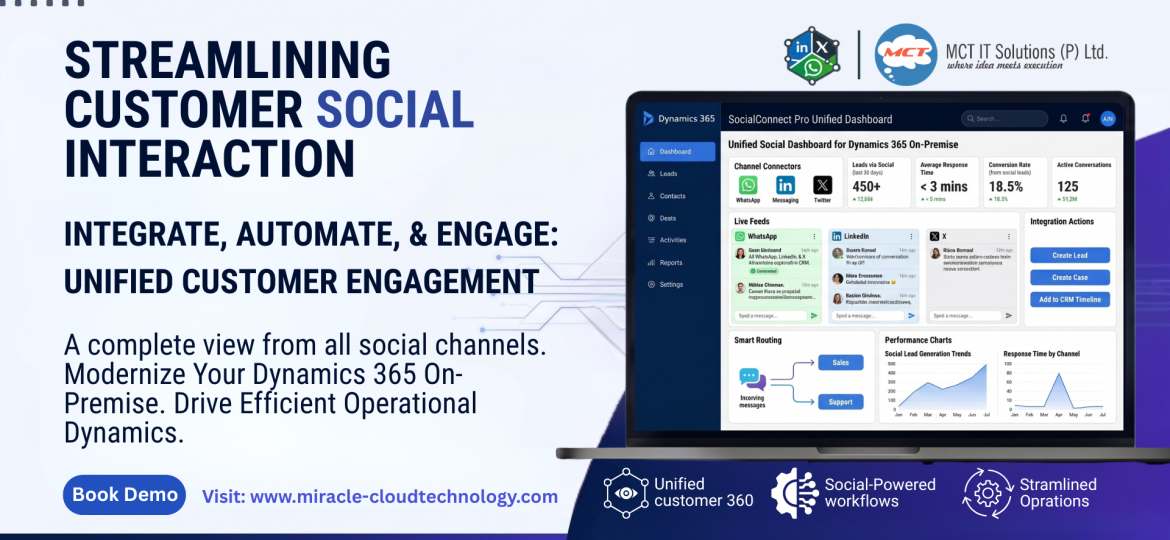
That’s where SocialConnect Pro comes in. Designed to work with both Dynamics 365 On-Premise and Dynamics 365 Online, it bridges the gap between social communication channels and CRM operations. Instead of switching between platforms, teams can manage conversations, create leads, track customer interactions, and automate workflows directly within Dynamics 365.
In my experience, the biggest advantage isn’t just convenience – it’s visibility. When social conversations become part of your CRM strategy, sales and service teams gain a complete view of every customer interaction. This article shares practical ways to integrate SocialConnect Pro, optimize workflows, and maximize the value of your Dynamics 365 investment.
Why Social Media Integration Matters
Customers no longer rely solely on email or phone calls. They expect businesses to respond through their preferred channels.
When social conversations remain outside CRM, organizations often face:
- Missed lead opportunities
- Delayed response times
- Incomplete customer records
- Manual data entry
Integrating social channels into Dynamics 365 helps eliminate these challenges while improving customer engagement and operational efficiency.
Step 1: Connect Your Social Channels
Start by integrating key communication platforms such as:
- WhatsApp Business
- LinkedIn Messaging
- X (Twitter)
The goal is simple: create a centralized communication hub inside Dynamics 365. This ensures every interaction is captured and accessible to the right teams.
Step 2: Automate Lead and Case Creation
One feature I always recommend implementing first is automated record creation.
For example:
- Sales inquiries automatically become Leads
- Support requests automatically become Cases
- Social mentions can trigger follow-up activities
This reduces manual effort and ensures important conversations never fall through the cracks.
Step 3: Create a Unified Customer Timeline
Customer context drives better decisions.
By storing social interactions directly within CRM records, teams can instantly view:
- Previous conversations
- Open opportunities
- Service history
- Customer preferences
This creates a true 360-degree customer view and enables more personalized engagement.
Step 4: Implement Smart Routing
Not every message belongs with the same team.
Configure routing rules to automatically direct:
- Product inquiries to Sales
- Service requests to Support
- Escalations to Senior Agents
This improves response times and helps maintain service quality as conversation volume grows.
Practical Tips for Better Results
Standardize Response Templates
Create reusable responses for common questions to improve consistency and efficiency.
Use CRM Workflows
Automate follow-up tasks, notifications, and customer acknowledgments whenever a social interaction is received.
Monitor Performance Metrics
Track:
- First response time
- Lead conversion rate
- Case resolution time
- Channel performance
These metrics help identify opportunities for continuous improvement.
Why a Hybrid Approach Works Best
In my opinion, the hybrid architecture is where SocialConnect Pro delivers the most value.
Organizations gain:
- The security of an on-premise CRM
- The flexibility of modern social communication
- Better scalability for enterprise workloads
- Greater control over customer data
This balance is particularly important for businesses operating in regulated industries where security and compliance remain top priorities.
Conclusion
SocialConnect Pro Advanced Hybrid CRM Social Media helps organizations modernize customer engagement without sacrificing the security and control of Dynamics 365 On-Premise.
By centralizing social conversations, automating lead management, and creating a complete customer view, businesses can improve productivity, response times, and customer satisfaction.
As customer expectations continue to evolve, is your Dynamics 365 environment ready to turn social conversations into measurable business opportunities?