

Introduction
Customer expectations have changed dramatically. Today, customers expect quick responses whether they contact your business through WhatsApp, LinkedIn, or social media platforms. The surprising reality is that many Dynamics 365 On-Premise organizations still rely on manual processes to manage these interactions, leading to delayed responses, missed opportunities, and inconsistent customer experiences.
In my experience, customer service automation is no longer a luxury—it’s a competitive necessity. This is where Social Connect helps. By integrating social channels directly into Dynamics 365, organizations can automate customer interactions, streamline service processes, and provide faster support without compromising security or control.
Why Customer Service Automation Matters
Every manual task adds friction to the customer journey.
When agents spend time copying messages, creating cases manually, or switching between applications, customer satisfaction suffers. Automation removes these bottlenecks and allows teams to focus on solving customer problems rather than managing administrative work.
Step 1: Centralize Customer Conversations
The first step is bringing all customer communications into a single workspace.
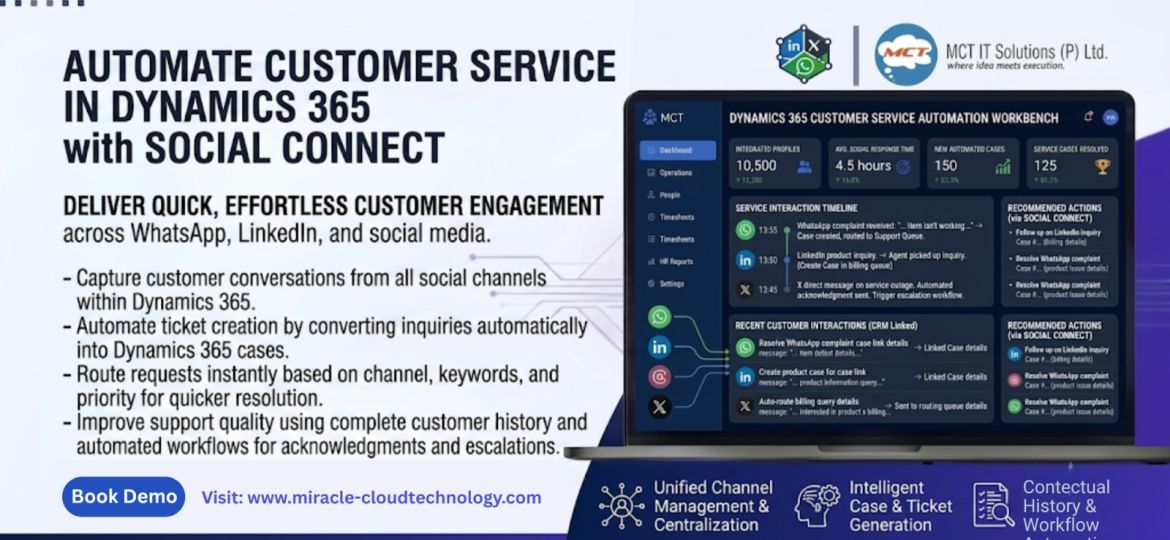
With Social Connect, messages from WhatsApp, LinkedIn, and X (Twitter) are managed directly within Dynamics 365. This gives agents complete visibility into customer interactions without leaving CRM.
Practical Tip: Create a dedicated service dashboard so support teams can monitor all incoming conversations in one place.
Step 2: Automate Case Creation
One of the biggest productivity gains comes from automatic case generation.
Instead of relying on agents to manually create service tickets, Social Connect can automatically convert customer inquiries into Dynamics 365 cases.
Example: A customer submits a complaint through WhatsApp. The system instantly creates a service case and routes it to the appropriate queue.
Step 3: Implement Intelligent Routing
Not every request belongs to the same team.
Use routing rules to automatically assign conversations based on keywords, channel, product, or priority level. This reduces response times and ensures the right agent handles the issue from the start.
Step 4: Maintain a Complete Customer History
Customer service becomes far more effective when agents have context.
Social Connect stores conversation history directly against customer records, providing a complete timeline of interactions. Agents can quickly understand previous discussions before responding.
This improves both customer experience and first-contact resolution rates.
Step 5: Use Workflows for Repetitive Tasks
Many customer service activities can be automated through Dynamics 365 workflows.
Consider automating:
- Acknowledgment messages
- Case assignment notifications
- Escalation processes
- Follow-up reminders
- Status update communications
These small automations create significant efficiency gains over time.
Best Practices for Success
Keep CRM as the Single Source of Truth
Avoid maintaining customer information across multiple platforms. Store interactions, cases, and communication history within Dynamics 365 whenever possible.
Measure Service Performance
Track key metrics such as:
- First response time
- Case resolution time
- Customer satisfaction
- Social channel response rates
What gets measured gets improved.
Start Small and Scale
Begin with one channel, such as WhatsApp, optimize the process, and then expand to additional platforms.
Why Social Connect Makes a Difference
Many integration solutions focus solely on connectivity. Social Connect focuses on business outcomes.
It helps Dynamics 365 enterprises:
- Reduce manual effort
- Improve customer response times
- Increase agent productivity
- Maintain data security
- Deliver consistent customer experiences
For organizations operating in secure On-Premise environments, this combination is especially valuable.
Conclusion
Customer service automation is not about replacing people—it is about empowering them to work more efficiently. By centralizing social conversations, automating case creation, and leveraging Dynamics 365 workflows, organizations can significantly improve service quality and operational efficiency.
The question is no longer whether customer service should be automated—it is how quickly your organization can take advantage of it.
How is your team currently managing customer conversations across social channels?